Your park was fuller than last year. Yet rental revenue lagged behind. You sold more nights, but at a lower average price. Was that extra occupancy worth the discount? NBTC reports: in the first half of 2026, overnight stays at holiday parks fell by 2,5 percent. Read the article NBTC observes shorter length of stay . That makes the question topical: how do you generate more rental revenue from the cottages you have available?
Hotels have been using RevPAR for years. I rarely hear the term in the leisure accommodation sector. This metric combines occupancy and price. You can see how much rental revenue you generate from your properties. And you can see which combination of price and occupancy makes your revenue target achievable.
What is RevPAR?
RevPAR stands for Revenue Per Available Room: rental revenue per available room per night. At a holiday park, this refers to cottages, chalets, or lodges. At a campsite, you apply the same calculation to available camping pitches. In this article, I refer to them as units.
Each unit counts as one. A six-person cottage counts just as much as a two-person cottage. An available unit that remains empty also counts.
You calculate with two figures from your reservation system. The occupancy rate is the percentage of available unit nights that you rent out. The average nightly rate is the rental price that guests actually pay, not the price on your website.
Calculate rental revenue excluding VAT and tourist tax. This ensures your calculation aligns with the rental revenue in your records. Keep additional revenue, such as breakfast and bicycle rentals, separate.
Occupancy rate × average nightly price = RevPAR
60 percent × € 105 = € 63
So, you generate an average rental revenue of €63 per available unit per night. Empty nights have been included.
What is an extra €1 worth to RevPAR?
Suppose you have 50 cottages that are all available for 30 nights. That is 1.500 available cottage nights.
€63 × 1.500 cottage nights = €94.500 rental revenue
Every extra euro from RevPAR therefore generates an additional €1.500 in rental revenue during this period.
It works the other way around as well. Do you want to achieve €105.000 in rental revenue during the same period? Then you need €70 RevPAR: €105.000 divided by 1.500 available cottage nights. You can achieve this, for example, with 70 percent occupancy at an average of €100 per night.
Higher occupancy does not automatically mean more revenue
The same park achieves very different results with different combinations of occupancy and price.
| Context | Occupation | Average night price | RevPAR | Rental revenue in 30 nights |
| Initial situation | 60 % | € 105, - | € 63, - | € 94.500, - |
| Higher occupancy, lower price | 80 % | € 75, - | € 60, - | € 90.000, - |
| Lower occupancy, higher price | 55 % | € 125, - | € 68,75 | € 103.125, - |
Calculation examples, excluding VAT and tourist tax. A different price does not guarantee this occupancy.
At 80 percent, your park is fuller. However, rental revenue is €4.500 lower than in the baseline situation. At 55 percent, more cottages are vacant. Nevertheless, the higher average price yields an extra €8.625.
The highest occupancy rate is therefore not an end in itself. RevPAR shows what you miss if you look only at occupancy or only at price.
How much extra occupancy does your discount require?
You plan for a 60 percent occupancy rate at an average of €105 per night. That is €63 RevPAR. To attract more bookings, you are considering a discount.
At an average of €90 per night, you need 70 percent occupancy for the same €63 RevPAR.
€63 ÷ €90 = 70 percent occupancy
So, you need to grow from 60 to 70 percent to achieve the same rental revenue. Only above that level does the lower average price generate more revenue.
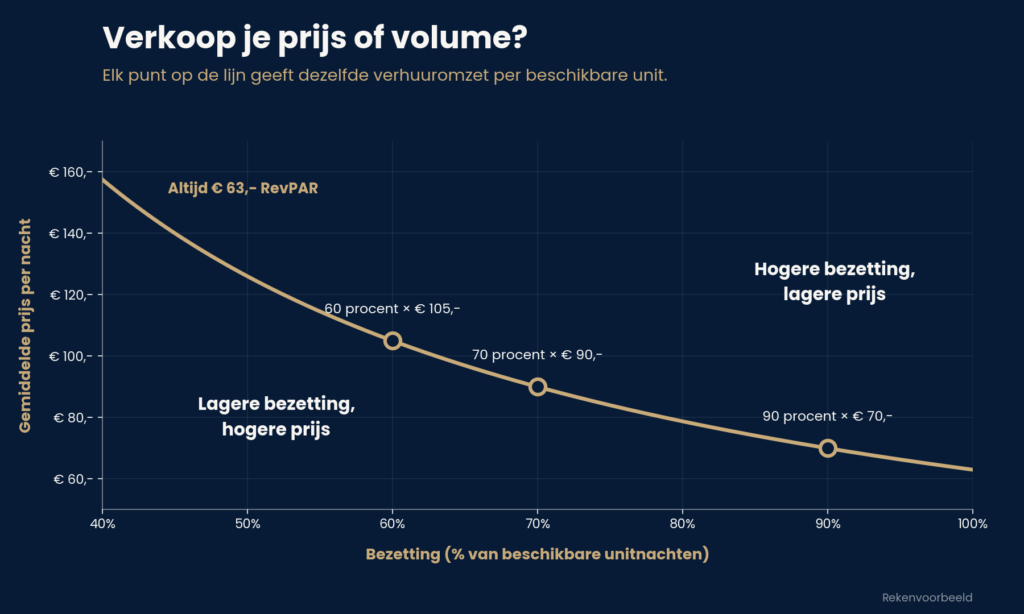
This example concerns the average price of all nights sold during that period. Do you only offer a discount on remaining cottages? Then calculate the expected revenue from existing and new bookings combined.
With every discount, ask yourself: does this really result in extra nights? Or am I giving a discount to guests who would have paid a higher price anyway? Also check whether the promotion only shifts bookings from a different cottage or a different period.
Do you want to secure bookings in advance for a quiet period? Then offer a targeted early booking rate that cannot be cancelled. The guest chooses certainty, and you secure the revenue.
It works the other way around too. Do bookings drop after a price increase? Check whether your price still aligns with demand. Consider the usual booking pace for that period.
With pricing, you are constantly looking for the combination that generates more rental revenue. You can read how to determine your pricing position and structure your rates in the article on pricing strategy.
Respond per period based on demand, price, and availability
An annual average hides the difference between a quiet midweek and a busy weekend. Therefore, calculate RevPAR per month or holiday period and examine individual days where necessary. Do the same for each type of cottage.
Are your two-person cottages sold out and are six-person cottages standing empty? Then offer a larger cottage as spacious accommodation for two, at a suitable price. Do two-person cottages consistently fill up first? Then raise their price sooner.
When demand is high, it comes down to the price of your remaining cottages. Add holidays, public holidays, and events to a demand calendar. Also include the holiday periods of the countries your guests come from. You can read how to build this calendar in the step-by-step plan for a demand calendar.
Is a period filling up faster than expected? Then increase the price of your remaining cottages in time.
During quiet periods, investigate what generates extra bookings. Consider couples outside of school holidays or business groups during the week. The latter requires meeting space, reliable Wi-Fi, catering, and made-up beds.
Also review your arrival days and minimum stay duration. Does a guest want to come from Thursday to Sunday, while you only offer Monday and Friday as arrival days? Then exclude that request. Offer unsold periods closer to arrival specifically for other stay durations, with their own nightly rate.
Also check if your booking settings allow those stays. In the article on last-minute bookings, you can read how availability and stay conditions unintentionally block bookings.
Track how quickly your bookings are coming in
Also include your desired RevPAR, average nightly rate, and occupancy rate in your demand calendar. This makes your revenue target for each period concrete.
Track at least weekly how many cottage nights are added and at what price. That is your booking pace. Take cancellations into account.
The time between booking and arrival is called the booking window. Some guests book months in advance, others only a few days before arrival. Therefore, additional bookings are added for a future holiday period. Your current booking balance does not necessarily have to be at your final target yet.
Therefore, compare it with the same moment before arrival last year. Compare four weeks before the autumn break with four weeks before the autumn break last year.
How many cottage nights had you sold by then? At what average price? And what RevPAR had you already booked at that moment? This shows you whether you are ahead or behind and what role price and occupancy play in that. Use that insight to make targeted adjustments.
Do you want to continue with that comparison? In the article about the revenue budget, I explain how bookings build up toward arrival. There you can also see if you are on track.
The same rent, different guests, different revenue
RevPAR only counts rental revenue. The number of guests in the cottage and their additional spending are not included. If your park has catering facilities, a shop, or activities, that is the next step.
Compare two bookings for the same six-person cottage. Both guests stay three nights for €150 per night.
| frames | navigate | |
| Number of guests | 2 | 6 |
| Number of nights | 3 | 3 |
| Total rental revenue | € 450, - | € 450, - |
| Extra spending per guest per night | € 35, - | € 20, - |
| Total additional revenue | € 210, - | € 360, - |
| Total revenue from the booking | € 660, - | € 810, - |
Illustrative calculation example, excluding VAT and tourist tax. In this case, the additional revenue accrues entirely to the park.
The couple spends 75 percent more per person on extras. Yet the family generates €150 more in total revenue. The number of guests per cottage therefore counts, in addition to their spending. Therefore, during peak times, look at the occupancy rate alongside the rental price.
To track total revenue, use TRevPAR: Total Revenue Per Available Room. You divide the total revenue from your park operations by all available unit nights, including vacancies.
Additionally, measure the average number of guests staying in a rented holiday home. Divide the additional revenue from overnight guests by the number of nights they stay. This calculates the average extra spending per guest per night. Keep spending by day visitors separate.
Do you outsource the catering? Then the restaurant revenue belongs to the catering entrepreneur. For your park, the rent or fee you receive counts.
Start small with the next holiday period
- Determine how many cottage nights you have available and what rental revenue you want to achieve. You calculate your RevPAR using the calculation tool.
- Divide your revenue target by those available cottage nights. That is your required RevPAR.
- Calculate which combinations of occupancy and average nightly rate apply. Use the same holiday period last year as a reference.
- Track your booking pace weekly. Compare your booking status with the same time before arrival last year and choose your action: adjust price, reach other guests, or expand stay conditions.
- Afterwards, calculate your achieved RevPAR and compare it with your goal and with last year.
With thanks to (author of this article):
From MinersRepublic, Henri-Dick Rondhuis helps independent holiday parks and leisure hotels translate their booking data into choices regarding pricing, occupancy, and offerings. Do you want to know where your park is missing out on revenue? See how Henri-Dick helps with that.
This is the first article in a series of three. The next one is about GOPPAR: what remains after operational costs? You can read about that in November. The third is about extra revenue from your guests, before and during their stay.